
School Visitor Monitoring with Video Surveillance: Complete Guide to Entrance Cameras & Visitor Verification | Affinitech Store
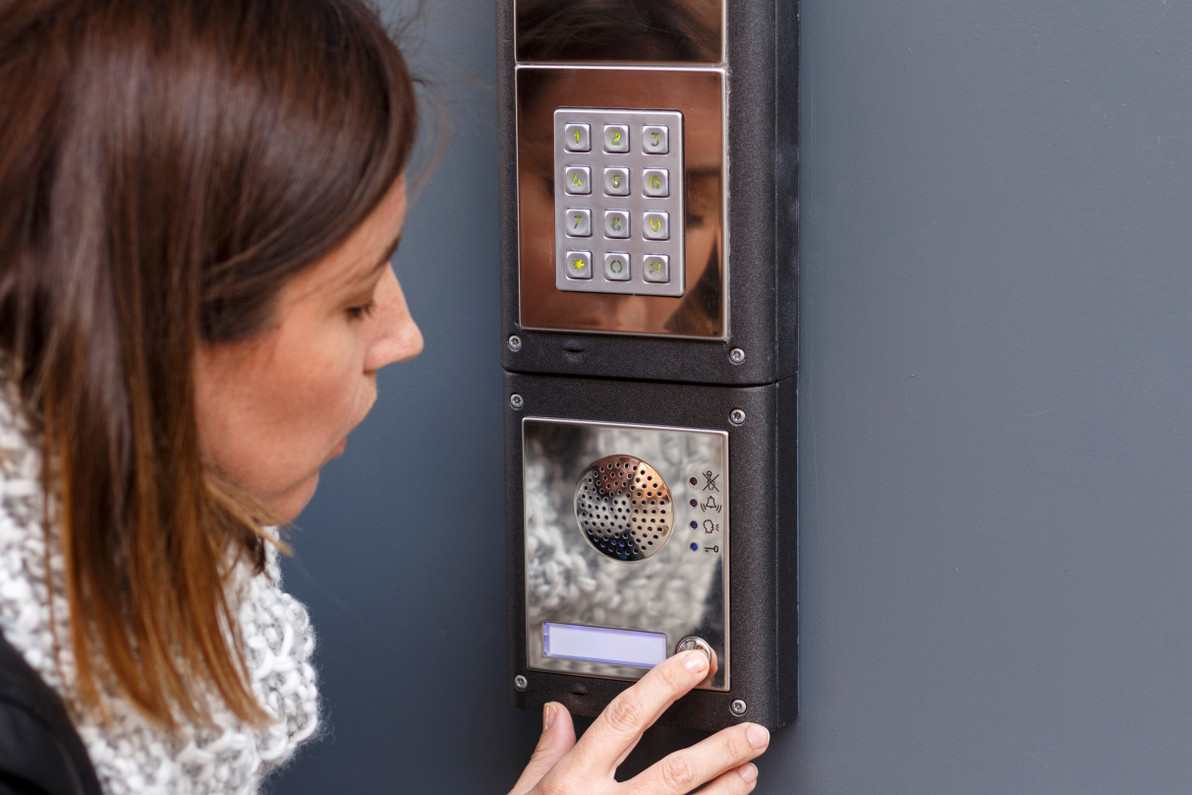
Every visitor who enters an elementary, middle or high school passes through the same few points: the parking lot, the front entrance, the vestibule and the main office. School visitor monitoring with video surveillance gives staff a clear view of who is approaching, who is asking to enter and where visitors go once they are inside. When cameras are placed and configured correctly, and connected to intercoms, access control and visitor management systems, they help front office staff make faster, safer decisions about who gets in.
This guide is part of the Affinitech school security camera series. For a full overview, start with our pillar article, Complete Guide to School Security Cameras for K-12 & Higher Education. This article focuses on the camera side of visitor monitoring. For check-in software and door control, see Access Control & Visitor Management Systems for Elementary Schools.
Quick Answer: Effective school visitor monitoring uses video surveillance at every stage of a visit: cameras covering parking lots and approaches, identification-quality cameras and video intercoms at the main entrance, coverage inside the secure vestibule and front office, and cameras along hallways visitors use. The best systems integrate video with access control and visitor management, so staff can verify a visitor's face before unlocking the door, match video to check-in records and quickly review where a visitor went during their time in the building.
Want a Clearer View of Every Visitor?
Affinitech can evaluate your entrances, vestibules and front office, then recommend cameras, intercoms and integrations that help staff verify visitors with confidence.
Request a School Security AssessmentWhy Video Matters in School Visitor Management
Most schools already require visitors to check in. Video surveillance strengthens that process in ways a sign-in sheet or check-in kiosk cannot:
- Verification before entry. Staff can see and speak with visitors before unlocking the door.
- A record of who entered. Video provides visual confirmation that matches check-in records.
- Awareness after check-in. Cameras help staff confirm visitors went where they said they were going.
- Detection of tailgating. Video shows when someone follows an approved visitor through the door.
- Evidence when something goes wrong. Clear footage of faces and vehicles supports investigations and law enforcement.
School Visitor and Surveillance Statistics
97% of Public Schools Require Visitor Check-In
According to the National Center for Education Statistics (NCES), requiring visitors to check in and wear badges was among the most commonly reported safety practices, at 97 percent of public schools in 2021–22.
97% Control Access to School Buildings
NCES also reports that 97 percent of public schools controlled access to school buildings during school hours in 2021–22.
93% Use Security Cameras
93 percent of public schools reported using security cameras to monitor the school in 2021–22, according to NCES.
Source: U.S. Department of Education, National Center for Education Statistics (NCES), Safety and Security Practices at Public Schools, School Survey on Crime and Safety (SSOCS), 2021–22.
The Visitor Journey: Where Cameras Belong
The most effective way to plan visitor monitoring is to follow the path a visitor takes, from arriving on campus to leaving the building.
| Stage | Camera Purpose | Recommended Coverage |
|---|---|---|
| 1. Arrival | See vehicles and people approaching | Parking lots, drop-off loops, sidewalks; license plate cameras at entry drives where appropriate |
| 2. Main entrance | Identify visitors before entry | Identification-quality camera at face height plus a video intercom |
| 3. Secure vestibule | Observe visitors while they wait | Camera covering the full vestibule and transaction window |
| 4. Front office | Record check-in interaction | Camera on the check-in counter and badge printing area |
| 5. Inside the building | Confirm visitor movement | Hallway and intersection cameras along common visitor routes |
| 6. Departure | Confirm visitors leave | Exit door and parking lot coverage |
For entrance design details, see Securing Elementary School Entrances with Access Control and School Door Access Systems.
Getting Identification-Quality Video at the Entrance
The most common visitor monitoring mistake is a camera that shows someone at the door but not who. A wide camera mounted high above an entrance often captures the tops of heads, hats and backlit silhouettes.
Pixel Density for Identification
The international standard IEC 62676-4 defines image detail levels for surveillance. For identifying a person, it calls for about 250 pixels per meter (roughly 76 pixels per foot) at the subject. Recognition requires about 125 pixels per meter, while simply detecting a person requires far less.
| Detail Level | Approx. Pixels per Meter | Visitor Monitoring Use |
|---|---|---|
| Detect | 25 | Someone is approaching the building |
| Observe | 62 | What a person is doing in the parking lot or walkway |
| Recognize | 125 | Recognize a known parent or staff member |
| Identify | 250 | Identify an unknown visitor beyond reasonable doubt |
Entrance Camera Best Practices
- Mount at least one camera low enough to capture faces straight on, not from directly overhead.
- Use wide dynamic range (WDR) to handle bright daylight behind visitors.
- Place a camera inside the vestibule facing the inner door to capture faces as visitors approach the office.
- Pair an overview camera with a tighter identification camera at each main entrance.
- Verify pixel density in the actual installed view, not just the camera's rated resolution.
Browse cameras suited to school entrances:
Video Intercoms and Door Stations
A video intercom, or network door station, lets front office staff see and talk with visitors before unlocking the door. For most schools, it is the single most important visitor monitoring device.
- Two-way audio lets staff ask the visitor's name and purpose.
- Face-level cameras capture clearer images than ceiling-mounted cameras.
- Integrated door release lets staff unlock the door after verification.
- Recording preserves a record of every call to the VMS.
- Mobile answering lets authorized staff respond from anywhere on supported platforms.
Explore network door stations and intercom cameras from manufacturers including Axis Communications.
Need Help Designing Your Entrance Coverage?
Affinitech can help you choose entrance cameras and video intercoms that capture clear faces, in real lighting conditions, at your school's front door.
Contact an Education Security Specialist Get a QuoteIntegrating Video With Visitor Management and Access Control
Video is most valuable when it is connected to the other systems that control visitor entry.
| Integration | What It Enables |
|---|---|
| Access control | Door unlock events linked to video clips; unlock from the camera view after verification |
| Visitor management software | Check-in records matched to video timestamps; ID scanning and screening where used |
| Video intercom | Visitor calls recorded and linked to the door they used |
| Lockdown | Visitor entry paused automatically; entrance cameras displayed for responders |
| VMS search | Fast review of where a visitor went after check-in |
Learn more about integration features in Best VMS Features for Educational Facilities and about secure entry in Best Lockdown Solutions for Elementary Campuses.
Monitoring Visitors After Check-In
Once a visitor has a badge, many schools lose track of them. Video helps close that gap without requiring constant monitoring.
Forensic Search
Smart search tools can locate a visitor across multiple cameras by clothing color or appearance, letting staff quickly confirm where a visitor went. See AI Analytics in School Video Management Systems.
Hallway Coverage on Visitor Routes
Cameras at hallway intersections between the office and common destinations, such as classrooms, the gym and the cafeteria, provide a reliable record of visitor movement.
Tailgating Detection
Reviewing entrance video, or using analytics where available, helps staff spot people who follow an approved visitor through the door without checking in.
Live Monitoring at the Front Office
A front office monitor showing the entrance, vestibule and nearby hallways gives staff continuous awareness without leaving their desk. Explore displays for office monitoring stations.
Parking Lot and Arrival Monitoring
Visitor monitoring starts before someone reaches the door. Parking lot cameras help staff notice vehicles that linger, people walking toward unmonitored doors or visitors arriving during sensitive times such as dismissal.
- Cover visitor parking and the walkway to the main entrance.
- Use license plate recognition at entry drives where policy and state law allow.
- Use loitering analytics near entrances and drop-off areas.
- Ensure low-light performance for early arrivals, evening events and winter afternoons.
Visitor Monitoring by School Type
| School Type | Visitor Monitoring Priorities |
|---|---|
| Elementary Schools | Frequent parent visits, volunteers and custody concerns; strong entrance identification and video intercom |
| Middle Schools | Main entrance verification plus hallway coverage on visitor routes |
| High Schools | Multiple entrances, athletic and event visitors, larger parking areas |
| District Offices | Public visitors, board meetings and centralized monitoring of school entrances |
| Colleges & Universities | Open campuses; focus on residence halls, labs and restricted buildings |
Privacy and Policy Considerations
| Consideration | Best Practice |
|---|---|
| Signage | Post notice that entrances and common areas are under video surveillance |
| Audio | Video intercom audio is typically expected; continuous audio recording elsewhere may be regulated by state law |
| Facial recognition | Some states restrict facial recognition in schools; review state law before using it |
| License plate data | Define retention and access rules for plate reads |
| Student records | Video directly related to a student may become part of an education record under FERPA |
| Retention | Keep entrance video long enough to support delayed investigations |
Important: Privacy, recording and biometric laws vary by state. This article provides general educational information and should not be treated as legal advice. Consult district legal counsel when setting visitor monitoring policies.
Step-by-Step Visitor Monitoring Implementation Guide
Step 1 — Map the Visitor Journey
Walk the route from parking lot to front office to common destinations and back.
Step 2 — Assess Existing Cameras
Check whether current entrance cameras capture identifiable faces in real lighting.
Step 3 — Add Identification Coverage
Install face-level cameras and verify pixel density at each main entrance.
Step 4 — Install Video Intercoms
Give front office staff a way to see and speak with visitors before unlocking doors.
Step 5 — Cover the Vestibule and Office
Ensure visitors are recorded while waiting and checking in.
Step 6 — Extend Coverage to Visitor Routes
Add hallway cameras along common visitor paths.
Step 7 — Integrate Systems
Connect video with access control, visitor management and lockdown.
Step 8 — Set Up Office Monitoring
Provide a front office display with entrance and vestibule views.
Step 9 — Train Staff
Train office staff on verification procedures, intercom use and video search.
Step 10 — Review and Adjust
Review footage quality, sun angles and incident outcomes regularly.
School Visitor Monitoring Checklist
- ☐ Visitor journey mapped from parking lot to exit
- ☐ Identification-quality camera at every main entrance
- ☐ Pixel density verified in installed views
- ☐ WDR cameras where visitors are backlit
- ☐ Video intercom at the main entrance
- ☐ Vestibule and front office covered
- ☐ Hallway cameras on common visitor routes
- ☐ Parking lot and walkway coverage
- ☐ Video integrated with access control and visitor management
- ☐ Visitor entry paused automatically during lockdown
- ☐ Front office monitoring display installed
- ☐ Signage and privacy policy in place
- ☐ Staff trained on verification and video search
Common Visitor Monitoring Mistakes
| Mistake | Better Approach |
|---|---|
| Entrance camera mounted too high to see faces | Add a face-level identification camera |
| Backlit visitors appear as silhouettes | Use WDR cameras and adjust angles |
| Unlocking doors without seeing the visitor | Install a video intercom and require verification |
| No coverage after check-in | Cover hallways on visitor routes |
| Video disconnected from check-in records | Integrate video with visitor management and access control |
| Ignoring side and secondary entrances | Cover every door visitors could use |
| Short retention periods | Keep entrance video long enough for delayed reports |
Recommended Product Categories
Network Door Stations
Video intercoms for verifying visitors before entry.
Dome and Turret Cameras
Identification-quality coverage for entrances and vestibules.
Outdoor Cameras
Parking lot, walkway and approach coverage.
AI Cameras
Loitering, line crossing and appearance search for visitor monitoring.
Video Management Systems
Integration, search and front office monitoring.
Quick Answers: School Visitor Monitoring
How do security cameras help with school visitor management?
Security cameras let staff verify visitors before entry, record who entered, monitor where visitors go after check-in and provide evidence for investigations.
Where should visitor monitoring cameras be placed?
Cameras should cover parking areas, the main entrance at face level, the secure vestibule, the front office check-in area and hallways along common visitor routes.
What camera resolution is needed to identify visitors?
Identification requires about 250 pixels per meter at the subject under IEC 62676-4. The camera's resolution, lens and distance together determine whether a view meets that level.
Frequently Asked Questions About School Visitor Monitoring
1. What is school visitor monitoring?
School visitor monitoring is the use of cameras, intercoms, access control and check-in systems to verify, record and track visitors from arrival to departure.
2. Why can't my entrance camera see faces clearly?
Cameras mounted too high, wide fields of view and bright backlighting are common causes. A face-level camera with WDR usually solves the problem.
3. What is a video intercom?
A video intercom, or network door station, combines a camera, microphone and speaker at the entrance so staff can see and talk with visitors before unlocking the door.
4. Should schools record video intercom calls?
Many schools record intercom video for verification and investigation. Review state audio recording rules and district policy.
5. How do cameras integrate with visitor management software?
Depending on the platforms, check-in records can be linked to video timestamps, and door unlock events can be tied to camera clips.
6. Can cameras track visitors after check-in?
Hallway coverage and forensic search tools help staff confirm where a visitor went without constant live monitoring.
7. What is tailgating?
Tailgating occurs when someone follows an approved person through a secured door without being verified.
8. Is facial recognition used for school visitors?
Some systems offer it, but some states restrict facial recognition in schools. New York, for example, prohibits schools from purchasing or using it.
9. Should parking lots be part of visitor monitoring?
Yes. Parking and walkway cameras help staff notice approaching visitors and vehicles before they reach the door.
10. How long should entrance video be kept?
Retention should follow district policy and be long enough to support investigations reported days or weeks later.
11. Do secondary entrances need cameras?
Yes. Any door a visitor could use, including side and athletic entrances, should be covered.
12. How can Affinitech help with visitor monitoring?
Affinitech can assess your entrances, recommend cameras and video intercoms, plan integrations and provide professional installation and configuration.
Visitor Monitoring Definitions
| Term | Definition |
|---|---|
| Secure Vestibule | An entry area between two sets of doors where visitors are held until verified. |
| Video Intercom | A door station combining a camera, microphone and speaker for visitor communication. |
| Pixels per Meter | A measure of image detail at the subject used to plan detection, recognition and identification. |
| IEC 62676-4 | An international standard for video surveillance system design, including image detail levels. |
| WDR | Wide Dynamic Range; captures detail in scenes with bright and dark areas. |
| Tailgating | Following an authorized person through a secured door without verification. |
| Forensic Search | Searching recorded video by attributes such as clothing color. |
School Visitor Monitoring: Key Takeaways
- Video strengthens visitor check-in by verifying, recording and tracking visitors.
- Plan cameras along the full visitor journey, from parking lot to exit.
- Entrance cameras must capture faces at identification-level detail.
- Video intercoms let staff verify visitors before unlocking doors.
- Integrating video with access control and visitor management closes gaps.
- Hallway coverage and forensic search help track visitors after check-in.
Related School Security Resources
- Complete Guide to School Security Cameras for K-12 & Higher Education
- Access Control & Visitor Management Systems for Elementary Schools
- Securing Elementary School Entrances with Access Control
- Best Security Cameras for Elementary Schools
- AI Analytics in School Video Management Systems
- Playground Security Camera Best Practices
Sources
U.S. Department of Education, National Center for Education Statistics (NCES), Safety and Security Practices at Public Schools, 2021–22.
International Electrotechnical Commission, IEC 62676-4, video surveillance system application guidelines.
New York State Education Department, determination on biometric identifying technology in schools, September 2023.
Know Who Is at Your Door, Every Time
From identification-quality entrance cameras to video intercoms and integrated visitor management, Affinitech can help your school monitor every visitor from arrival to departure.
Request a School Security Assessment Contact an Education Security Specialist
Recent Posts
-
School Visitor Monitoring with Video Surveillance: Complete Guide to Entrance Cameras & Visitor Verification | Affinitech Store
Every visitor who enters an elementary, middle or high school passes through the same few points: th … -
AI Analytics in School Video Management Systems: Complete Guide for K-12 & Campus Security | Affinitech Store
Most schools now have more cameras than anyone could ever watch. A typical high school may have doz … -
Managing Student Access Permissions in Schools: Complete K-12 & Campus Access Control Guide | Affinitech Store
Most school access control conversations focus on staff and visitors. But in middle schools, high s … -
Playground Security Camera Best Practices: Complete School Playground Surveillance Guide | Affinitech Store
The playground is one of the busiest, most active and hardest-to-supervise areas of any elementary …