
AI Analytics in School Video Management Systems: Complete Guide for K-12 & Campus Security | Affinitech Store
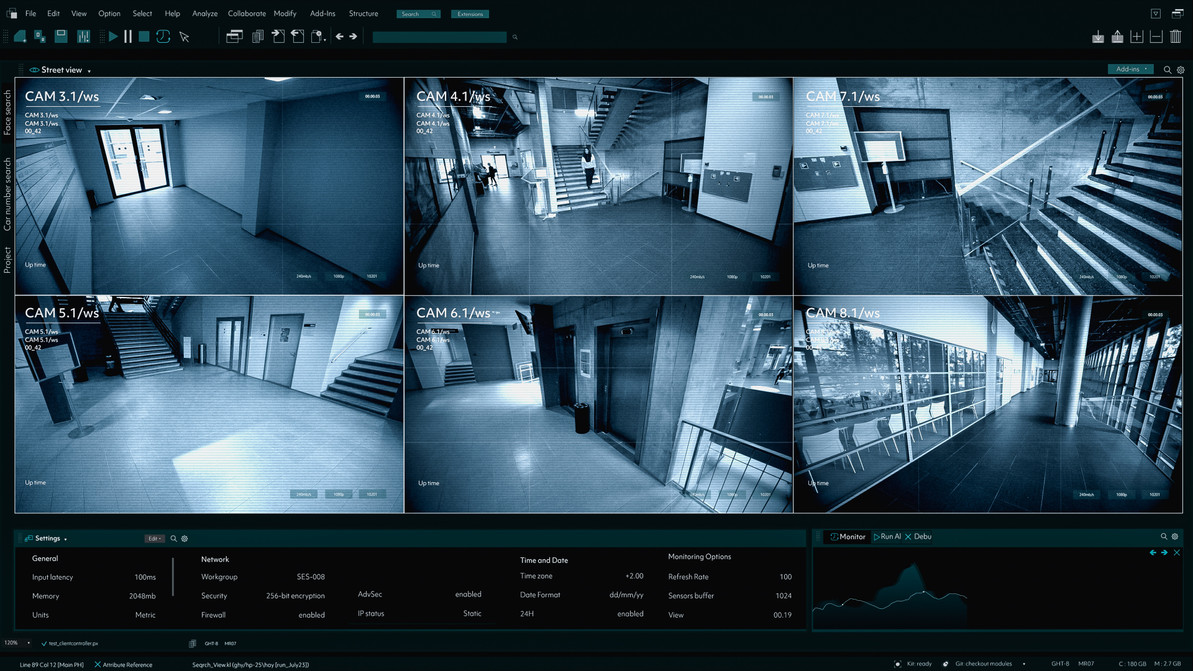
Most schools now have more cameras than anyone could ever watch. A typical high school may have dozens or even hundreds of cameras, yet only a few staff members are available to review video. AI analytics in school video management systems help close that gap by automatically detecting people, vehicles and activity, sending real-time alerts and making recorded video searchable in seconds. Used well, school VMS analytics turn passive recording into an active safety tool. Used carelessly, they can create false alarms, privacy concerns and community distrust.
This guide is part of the Affinitech school VMS series. For a full overview, start with our pillar article, School VMS Guide: Video Management Systems for Schools & Universities. This article explains what AI video analytics can do, where they help most in schools, and how to deploy them responsibly.
Quick Answer: AI analytics in school video management systems use machine learning to classify people and vehicles, detect events such as intrusion, line crossing and loitering, and power fast forensic search across many cameras. The most valuable school uses are after-hours intrusion alerts, perimeter and entrance monitoring, vehicle and parking monitoring, crowd awareness and faster incident investigations. Schools should require human verification of alerts, tune analytics to reduce false alarms, define clear alert routing, avoid restricted technologies such as facial recognition where state law prohibits them, and adopt written policies before deployment.
Exploring AI Analytics for Your School?
Affinitech can help you identify where analytics will add the most value, select compatible cameras and VMS software, and design alert workflows that fit your staff.
Request a School Security AssessmentWhy AI Analytics Matter for Schools
Video surveillance in schools has traditionally been reactive: something happens, and staff search through recordings afterward. AI analytics change that model in several ways:
- Too many cameras to watch. Analytics surface the few moments that matter instead of requiring staff to monitor every feed.
- Limited security staffing. Many schools have no one assigned to watch cameras full time.
- Large campuses. Parking lots, fields, playgrounds and perimeter fences are difficult to supervise.
- After-hours risk. Vandalism, break-ins and trespassing often happen when buildings are empty.
- Slow investigations. Searching hours of footage manually delays response to parents, students and law enforcement.
School Video Surveillance Statistics
93% of Public Schools Use Security Cameras
According to the National Center for Education Statistics (NCES), 93 percent of public schools reported using security cameras to monitor the school in the 2021–22 school year.
Security Staff Presence Has Declined
NCES reported that 61 percent of public schools had one or more security staff present at least once a week in 2021–22, down from 65 percent in 2019–20. With fewer people available to watch cameras, automated detection and alerting become more important.
Source: U.S. Department of Education, National Center for Education Statistics (NCES), School Survey on Crime and Safety (SSOCS), 2019–20 and 2021–22.
What Are AI Video Analytics?
Definition — AI Video Analytics: Software that uses machine learning models to automatically classify objects in video, such as people and vehicles, and detect defined events or behaviors, generating alerts, metadata and searchable records within a video management system.
Older motion detection triggered on any change in the image, so swaying trees, shadows and headlights caused constant false alarms. AI analytics classify what is moving, so a school can be alerted to a person on the roof after hours without being alerted to every passing car or blowing leaf.
Types of AI Analytics Used in Schools
| Analytic | What It Detects | School Use Case |
|---|---|---|
| Object classification | People, vehicles and other object types | Reduces false alarms from animals, weather and shadows |
| Intrusion / area detection | A person or vehicle entering a defined zone | After-hours alerts for rooftops, courtyards and closed buildings |
| Line crossing | Movement across a defined line | Perimeter fences, closed gates and restricted pathways |
| Loitering detection | A person remaining in an area too long | Entrances, parking lots and areas near playgrounds |
| Occupancy and crowd detection | People counts or unusual crowd formation | Cafeterias, hallways, dismissal areas and events |
| Vehicle analytics and license plate recognition | Vehicle types and plate numbers | Parking lots, pickup lines and entry gates |
| Forensic and appearance search | People or vehicles matching attributes such as clothing color | Missing student searches and incident investigations |
| Unusual activity detection | Activity that differs from typical patterns for a scene | Highlighting events worth reviewing |
| Tamper detection | Camera blocked, moved or defocused | Alerts when cameras are vandalized or covered |
| Audio analytics | Sounds such as raised voices or breaking glass (where supported and legally permitted) | Supplemental alerts in specific areas |
Where AI Analytics Add the Most Value in Schools
After-Hours Intrusion Detection
The clearest benefit of school analytics is detecting people in places they should not be when buildings are closed: rooftops, courtyards, playgrounds, athletic facilities and loading docks. Alerts can go to district security, monitoring centers or on-call administrators. See our playground security camera best practices for outdoor coverage tips.
Perimeter and Entrance Monitoring
Line crossing and loitering analytics can flag activity at fences, side doors and entrances during the school day, helping staff respond before a situation escalates.
Parking Lots and Pickup Lines
Vehicle analytics and license plate recognition help monitor parking areas, track vehicles involved in incidents and manage arrival and dismissal traffic.
Faster Investigations
Forensic search lets administrators find a student in a red jacket, a specific vehicle or activity in one hallway across many cameras in minutes rather than hours.
Crowd and Occupancy Awareness
Occupancy analytics help staff notice unusual gatherings in hallways, cafeterias or outdoor areas and plan supervision at busy times.
System Health
Tamper detection alerts staff when cameras are covered, moved or damaged, so coverage gaps are fixed quickly.
Not Sure Which Analytics Fit Your Campus?
Affinitech can map analytics to your buildings and staffing so alerts reach the right people without overwhelming them.
Contact an Education Security Specialist Get a QuoteAnalytics by Facility Type
| Facility | Highest-Value Analytics |
|---|---|
| Elementary Schools | Entrance loitering, playground and perimeter line crossing, after-hours intrusion |
| Middle Schools | Hallway occupancy, forensic search, after-hours intrusion |
| High Schools | Parking and vehicle analytics, crowd detection at events, forensic search, perimeter monitoring |
| School Districts | Centralized after-hours alerts across buildings, tamper detection, health monitoring |
| Colleges & Universities | Large-scale forensic search, LPR, crowd analytics, campus-wide intrusion alerts |
Edge, Server and Cloud Analytics
Analytics can run in different places, and each approach affects cost, bandwidth and scalability.
| Approach | How It Works | Considerations |
|---|---|---|
| Edge (in-camera) | Analytics run on the camera itself | Low bandwidth; capabilities depend on camera model; many current AI cameras include analytics |
| Server-based | Analytics run on VMS or analytics servers | Works with existing cameras; requires server capacity and licensing |
| Cloud-based | Analytics run in a cloud platform | Simplified management; depends on bandwidth and subscriptions |
| Hybrid | Edge detection with server or cloud search and alerting | Balances performance, cost and flexibility |
Learn more about deployment models in Hybrid VMS for School Districts and Cloud vs. On-Prem VMS for Schools.
False Alarms and Human Verification
No analytic is perfect. Detection accuracy depends on camera placement, lighting, weather, scene complexity and how rules are configured. In schools, the consequences of a false alarm can be serious.
In October 2025, an AI weapon detection system connected to a Maryland school district's cameras flagged a high school student's bag of chips as a possible gun. The district's safety team reviewed and canceled the alert after confirming there was no weapon, but police still responded and searched the student, and county leaders called for a review of the system. The incident shows why alert verification and clear communication workflows matter as much as the analytics themselves.
- Require human verification. Trained staff should review video before high-stakes actions are taken.
- Route alerts carefully. Decide exactly who receives each alert type and who is authorized to escalate.
- Communicate cancellations. Make sure a canceled alert reaches everyone who received the original.
- Tune analytics. Adjust zones, schedules and sensitivity to reduce nuisance alerts.
- Track performance. Log alerts, false alarms and outcomes to improve settings over time.
- Avoid alert fatigue. Too many alerts lead staff to ignore them; start with a small number of high-value rules.
Privacy, Policy and Legal Considerations
AI analytics raise additional privacy questions because they generate searchable data about student and staff movement.
| Consideration | Best Practice |
|---|---|
| Facial recognition | Some states restrict it in schools. New York's education commissioner prohibited schools from purchasing or using facial recognition technology in 2023. Review state law before considering it. |
| Biometric data | Some states regulate collection of biometric identifiers; confirm requirements before enabling biometric features |
| FERPA | Video and related records directly related to a student and maintained by the school may be education records |
| Bias and fairness | Review how analytics perform across different conditions and populations, and keep humans in the decision loop |
| Data retention | Set retention periods for video, metadata and alert logs |
| Transparency | Tell families and staff which analytics are used and why |
| Vendor data practices | Understand where cloud analytics data is processed and stored |
For more on student video privacy, see Elementary School Classroom Surveillance: Benefits & Privacy Considerations.
Important: Laws governing biometrics, facial recognition and student privacy vary by state and change frequently. This article provides general educational information and should not be treated as legal advice. Consult district legal counsel before deploying AI analytics.
AI Analytics Platforms and Cameras Available From Affinitech
Analytics capabilities, licensing and supported camera models vary by manufacturer and version. Confirm specific features with Affinitech before purchasing.
Avigilon
Avigilon platforms are known for AI-powered search, including Appearance Search, which helps locate people and vehicles across cameras. Explore Avigilon Alta for cloud-based deployments.
Axis Communications
Many Axis Communications cameras include built-in object analytics for detecting and classifying people and vehicles at the edge, which can feed alerts into the VMS.
Hanwha Vision
Hanwha Vision America offers AI cameras with on-board object detection and classification, plus cloud options through Hanwha OnCloud.
Milestone XProtect
Milestone Systems XProtect is an open platform that can integrate analytics from cameras and third-party providers, which suits districts that want flexibility in analytics choices.
Browse video management systems and software and licenses and extended warranties for analytics-related licensing.
Step-by-Step Guide to Deploying AI Analytics in Schools
Step 1 — Define Problems to Solve
Start with specific goals, such as after-hours rooftop intrusions or parking lot incidents, rather than enabling every analytic.
Step 2 — Review Laws and Policies
Confirm state rules on facial recognition, biometrics, audio and student privacy.
Step 3 — Assess Cameras and Placement
Analytics depend on good camera angles, lighting and resolution. Upgrade or reposition cameras where needed.
Step 4 — Choose Edge, Server or Cloud
Select the architecture that fits your cameras, network and budget.
Step 5 — Design Alert Workflows
Define who receives each alert, how it is verified, who can escalate and how cancellations are communicated.
Step 6 — Pilot and Tune
Test analytics in a few locations, then adjust zones, schedules and sensitivity.
Step 7 — Write the Policy
Document which analytics are used, data retention and who can search video.
Step 8 — Train Staff
Train administrators and security staff on verification, response and search tools.
Step 9 — Communicate
Inform families and staff about the analytics in use and their purpose.
Step 10 — Measure and Improve
Review alert volumes, false alarms and outcomes on a regular schedule.
School AI Analytics Checklist
- ☐ Specific safety problems identified for analytics
- ☐ State facial recognition and biometric laws reviewed
- ☐ Cameras positioned and lit for reliable detection
- ☐ Edge, server or cloud architecture selected
- ☐ Alert recipients and escalation paths defined
- ☐ Human verification required before high-stakes action
- ☐ Alert cancellation process communicated
- ☐ Analytics piloted and tuned
- ☐ Written analytics and data retention policy adopted
- ☐ Staff trained on alerts and forensic search
- ☐ Families and staff informed
- ☐ Alert performance reviewed regularly
Common AI Analytics Mistakes
| Mistake | Better Approach |
|---|---|
| Turning on every analytic at once | Start with a few high-value rules and expand |
| Acting on alerts without verification | Require trained staff to review video first |
| Sending alerts to too many people | Define targeted alert routing and escalation |
| Poor camera placement | Position and light cameras for analytics performance |
| Ignoring state law | Review facial recognition and biometric restrictions |
| No written policy | Adopt a policy before deployment |
| Never reviewing alert performance | Track false alarms and tune regularly |
Recommended Product Categories
AI Cameras
Cameras with built-in analytics for detection and classification.
Video Management Systems
VMS platforms with analytics, alerting and forensic search.
Cloud-Based Video Surveillance
Cloud analytics and centralized alerting across buildings.
Explore Cloud-Based Video Surveillance Solutions
Thermal Cameras
Reliable after-hours detection in darkness and poor weather.
Network Video Recorders
Recording and server capacity for analytics-enabled systems.
Quick Answers: AI Analytics in School VMS
What are AI analytics in a school VMS?
AI analytics use machine learning to classify people and vehicles, detect events such as intrusion and loitering, and make recorded video searchable by attributes, helping schools respond faster with limited staff.
What is the best use of AI analytics in schools?
After-hours intrusion detection, perimeter and entrance monitoring, parking lot analytics and faster forensic investigations are among the most valuable school uses.
Can AI analytics replace security staff?
No. AI analytics help staff focus on important events, but trained people must verify alerts and decide how to respond.
Frequently Asked Questions About AI Analytics in School VMS
1. How do AI analytics differ from motion detection?
Motion detection triggers on any pixel change, while AI analytics classify objects such as people and vehicles, greatly reducing false alarms from weather, shadows and animals.
2. Do AI analytics require new cameras?
Not always. Server-based or cloud analytics can work with many existing cameras, while edge analytics require cameras with built-in AI capabilities.
3. Can AI analytics detect weapons?
Some third-party products offer visual weapon detection. These systems can produce false positives, so human verification and careful alert workflows are essential.
4. Is facial recognition allowed in schools?
It depends on the state. New York prohibits schools from purchasing or using facial recognition technology, and other states regulate biometric data. Review state law first.
5. What is forensic search?
Forensic search lets users find recorded video by attributes such as clothing color, object type or vehicle, across many cameras at once.
6. How can schools reduce false alarms?
Improve camera placement and lighting, use object classification, set schedules and zones, tune sensitivity and review alert performance regularly.
7. Who should receive analytics alerts?
Alerts should go only to staff responsible for verifying and responding, such as district security or designated administrators, with clear escalation rules.
8. Do AI analytics work at night?
Many analytics work in low light with infrared or strong low-light cameras, and thermal cameras can provide reliable detection in complete darkness.
9. Are AI analytics data subject to FERPA?
Video and related records directly related to a student and maintained by the school may be education records. Consult legal counsel on handling analytics data.
10. What is license plate recognition used for in schools?
License plate recognition can help monitor parking lots, pickup lines and entry gates and support investigations involving vehicles.
11. Are AI analytics expensive?
Costs vary. Some cameras include analytics at no added cost, while advanced server or cloud analytics may require additional licenses or subscriptions.
12. How can Affinitech help with AI analytics?
Affinitech can recommend AI cameras and VMS platforms, help design alert workflows and provide professional installation and configuration services.
AI Analytics Definitions
| Term | Definition |
|---|---|
| Object Classification | Identifying whether a moving object is a person, vehicle or other type. |
| Edge Analytics | Analytics processed on the camera itself. |
| Line Crossing | An alert triggered when an object crosses a defined line. |
| Loitering Detection | An alert when a person stays in an area longer than a set time. |
| Forensic Search | Searching recorded video by attributes rather than time alone. |
| LPR | License Plate Recognition; reading vehicle plates from video. |
| False Positive | An alert triggered when the detected event did not actually occur. |
| Alert Fatigue | When frequent alerts cause staff to ignore or delay responses. |
AI Analytics in School VMS: Key Takeaways
- AI analytics help schools with many cameras and limited staff focus on what matters.
- After-hours intrusion, perimeter monitoring, parking analytics and forensic search offer the most value.
- Analytics can run on cameras, servers, the cloud or a hybrid.
- Human verification and clear alert routing are essential to prevent harmful false alarms.
- Some states restrict facial recognition and biometrics in schools.
- Start small, tune carefully and adopt a written policy before deployment.
Related School Security Resources
- School VMS Guide: Video Management Systems for Schools & Universities
- Best VMS Features for Educational Facilities
- How AI Cameras Help Protect Younger Students
- Hybrid VMS for School Districts
- Playground Security Camera Best Practices
- How Real-Time Alerts in VMS Improve Security and Response Times
Sources
U.S. Department of Education, National Center for Education Statistics (NCES), School Survey on Crime and Safety (SSOCS), 2019–20 and 2021–22.
New York State Education Department, determination on biometric identifying technology in schools, September 2023.
CBS News Baltimore, WBAL and TechCrunch, reporting on an AI weapon detection false alarm in Baltimore County, October 2025.
Put AI Analytics to Work for Your School
From AI cameras and VMS analytics to alert workflows and policy planning, Affinitech can help your school deploy video analytics that are effective, accurate and responsible.
Request a School Security Assessment Contact an Education Security Specialist
Recent Posts
-
AI Analytics in School Video Management Systems: Complete Guide for K-12 & Campus Security | Affinitech Store
Most schools now have more cameras than anyone could ever watch. A typical high school may have doz … -

Managing Student Access Permissions in Schools: Complete K-12 & Campus Access Control Guide | Affinitech Store
Most school access control conversations focus on staff and visitors. But in middle schools, high s … -
Playground Security Camera Best Practices: Complete School Playground Surveillance Guide | Affinitech Store
The playground is one of the busiest, most active and hardest-to-supervise areas of any elementary … -

Keycards vs. Mobile Credentials for School Staff: Complete K-12 Access Credential Guide | Affinitech Store
Every school access control system depends on one simple question: what do staff use to open the do …