
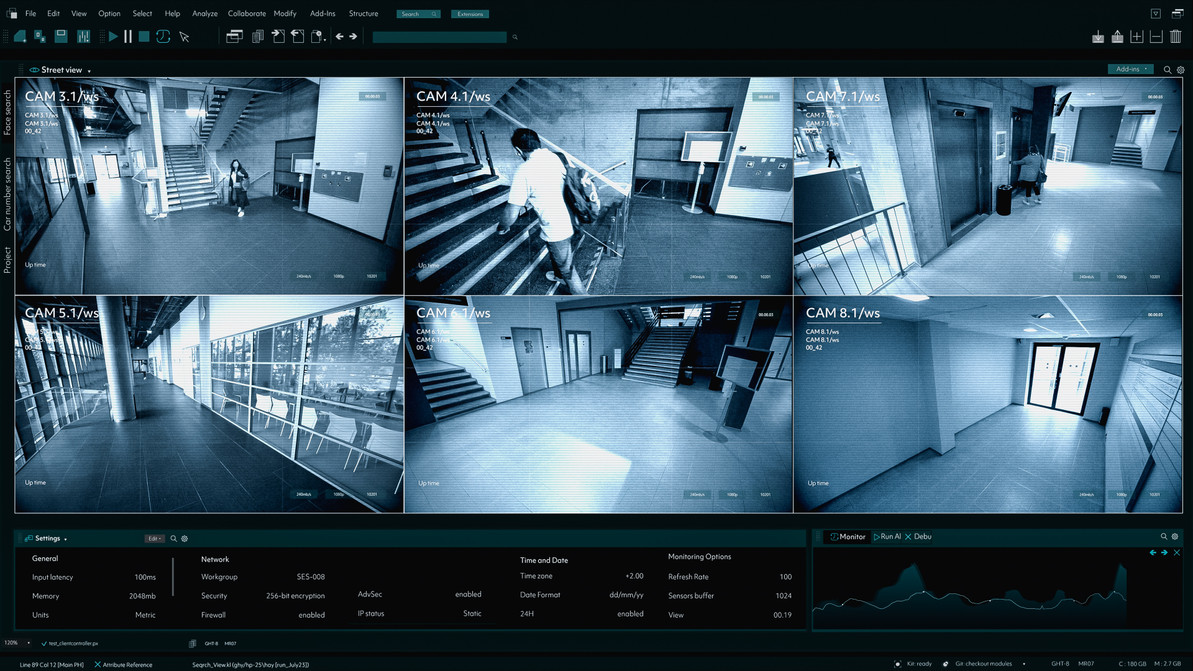
School VMS Guide: Video Management Systems (VMS) for Schools & Universities | Affinitech Store
Video Management Systems (VMS) for Schools & Universities
Video Management Systems (VMS) are the operational backbone of modern school surveillance systems. Whether managing a small elementary school or a large university campus, a school VMS allows security teams to monitor live video, investigate incidents, manage recordings, and improve emergency response.
This complete guide explains everything schools need to know about video management systems for schools, including cloud video surveillance for schools, campus VMS architecture, compliance requirements, AI analytics, storage planning, and best practices for implementation.
School VMS Industry Statistics
- More than 90% of public schools use security cameras as part of campus safety programs.
- Universities frequently manage hundreds to thousands of cameras across buildings and parking facilities.
- Cloud-based video surveillance adoption is rapidly growing due to scalability and remote management.
- AI analytics adoption continues to rise for threat detection and proactive monitoring.
Sources:
National Center for Education Statistics (NCES)
U.S. Department of Education
Campus Safety Magazine
SchoolSafety.gov
What is a School VMS?
A school Video Management System (VMS) is software used to manage, monitor, record, store, and analyze video from security cameras across educational facilities.
Core VMS Features
- Live Camera Monitoring
- Video Recording & Playback
- AI Video Analytics
- Event Search & Investigation
- Alert Management
- Role-Based Permissions
- Cloud & Hybrid Storage
- Access Control Integration
Benefits of Video Management Systems for Schools
| Benefit | Description |
|---|---|
| Improved Visibility | Monitor multiple campuses centrally. |
| Faster Response | Real-time monitoring reduces response times. |
| Incident Investigation | Rapid video retrieval improves investigations. |
| AI Detection | Proactive alerts reduce security risks. |
Cloud vs On-Premises School VMS
| Feature | Cloud VMS | On-Prem VMS |
|---|---|---|
| Deployment | Vendor Managed | Local Infrastructure |
| Scalability | Excellent | Moderate |
| Remote Access | Excellent | Limited |
School-Specific VMS Use Cases
Elementary Schools
- Entry monitoring
- Playground surveillance
- Visitor management integration
Middle Schools
- Hallway monitoring
- Vandalism prevention
- Student safety management
High Schools
- Parking lot surveillance
- Athletic field monitoring
- After-hours activity management
Universities
- Dormitory monitoring
- Parking garage surveillance
- Campus-wide security operations centers
Compliance Requirements
- FERPA
- HIPAA (Healthcare campus facilities)
- Clery Act
- Cybersecurity frameworks
- State privacy regulations
Implementation Guide
- Conduct security assessment
- Identify surveillance goals
- Evaluate infrastructure
- Choose cloud or on-prem deployment
- Select cameras and storage architecture
- Deploy VMS software
- Train staff
- Conduct regular audits
Related Technologies
- School Security Cameras
- Visitor Management Systems
- Emergency Notification Systems
- School Lockdown Systems
- Access Control Systems
- Mobile Credentials
- Cloud Security Solutions
Frequently Asked Questions
What is a school VMS?
Software that manages surveillance cameras and video data across educational facilities.
Should schools use cloud or on-prem VMS?
Cloud offers flexibility while on-prem provides greater infrastructure control.
Can VMS integrate with access control?
Yes. Most modern VMS platforms integrate with access control systems.
How much storage does a school VMS need?
Storage depends on camera count, resolution, retention requirements, and recording settings.
Recent Posts
-

Best Lockdown Solutions for Elementary Campuses: Complete K-5 School Lockdown Guide | Affinitech Store
When an emergency happens at an elementary school, the first minutes matter most. Young students dep … -

Hybrid VMS for School Districts: Complete Guide to Cloud & On-Prem Video Management | Affinitech Store
School districts rarely get to design a surveillance system from a blank page. Most are managing a m … -
Best Security Cameras for Middle Schools | School Security Camera Guide
Best Security Cameras for Middle Schools: Complete Middle School Security Camera Guide Choosing the … -
Access Control & Visitor Management Systems for Elementary Schools | Affinitech
Access Control & Visitor Management Systems for Elementary Schools Elementary schools need security …